

Navigating Canvas: Grades 7-12
Video transcript
This guide is a basic navigation of Canvas for seventh through 12th grades.
After you have logged in, click on Canvas. Here you will be brought to your dashboard. For easier navigation, click the three dots to change the view from list view to card view.
On our dashboard, we can see all of our classes. The name of the class tells you the grade, the teacher's last name, what period you have the class, and the name of the class.
Let's find out what class we are supposed to be in. First, click on your teacher's name. Now let's scroll to the bottom to look at our agenda. This agenda will be at the bottom of all of your classrooms, so no matter which teacher you click on, you can find your agenda.
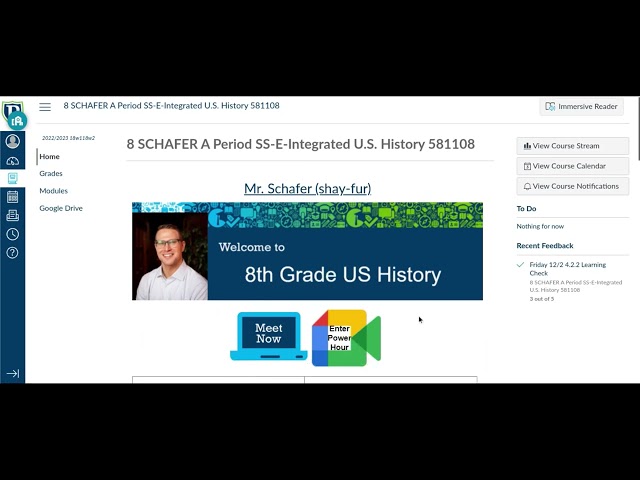
Let's say it's 8:35 and you are wondering what class you're supposed to be in. If we take a look at the schedule, you can see that A period starts at 8:35. Click on the dashboard to go back and view all your classes. Now we'll look for a class that says A period. I see Mr. Schaefer has A period U.S. history. To go to your A period, click on your teacher's name. From here, all we have to do is click on the Meet Now button to join our class.
Let's say we just finished lunch and we want to know what class we go to next. Navigate back to the bottom of your teacher's page to find the agenda. If the day is Monday, Tuesday, Thursday, or Friday, you will have D period after lunch. If the day is Wednesday, you will be working asynchronously, or independently, after lunch.
Since today is Monday, we have D period after lunch. How would you get to your D period class from here? If you said click on your dashboard and look for D period, you would be correct.
Next, let's check out our assignments for the day by clicking on the Modules tab. Each class has different modules. Our modules, or assignments, are organized by week, and each week is organized by day.
Let's check out an assignment. The subject is math and the topic is slope between two points. Here you can see an introduction to the assignment, "I Can" statements, directions, and instructions on how to turn the assignment in.